<img src="https://certify.alexametrics.com/atrk.gif?account=knr3r1xk/v20jL" style="display:none" height="1" width="1" alt="">
Skip to content
Automate Order Intake For Dynamics 365


Dynamics 365 Order Management & Order Processing

When orders still come in by email, EDI, portals, spreadsheets, or reps, Dynamics 365 only sees issues after they occur. OrderEase centralizes all incoming orders into one workflow, validates and structures them, and syncs clean sales orders into Dynamics 365 automatically.


OrderEase Logo

Turn POs into sales orders

Eliminate manual entry

Validate orders before D365 sync

Support EDI, portal, reps, and ecommerce in one flow

One Order Workflow

Dynamics 365 Order Management Starts Before the ERP Transaction

Dynamics 365 handles transactions but does not manage how orders arrive. OrderEase acts as the order management layer before your ERP and ensures Dynamics 365 only receives complete, accurate sales orders.
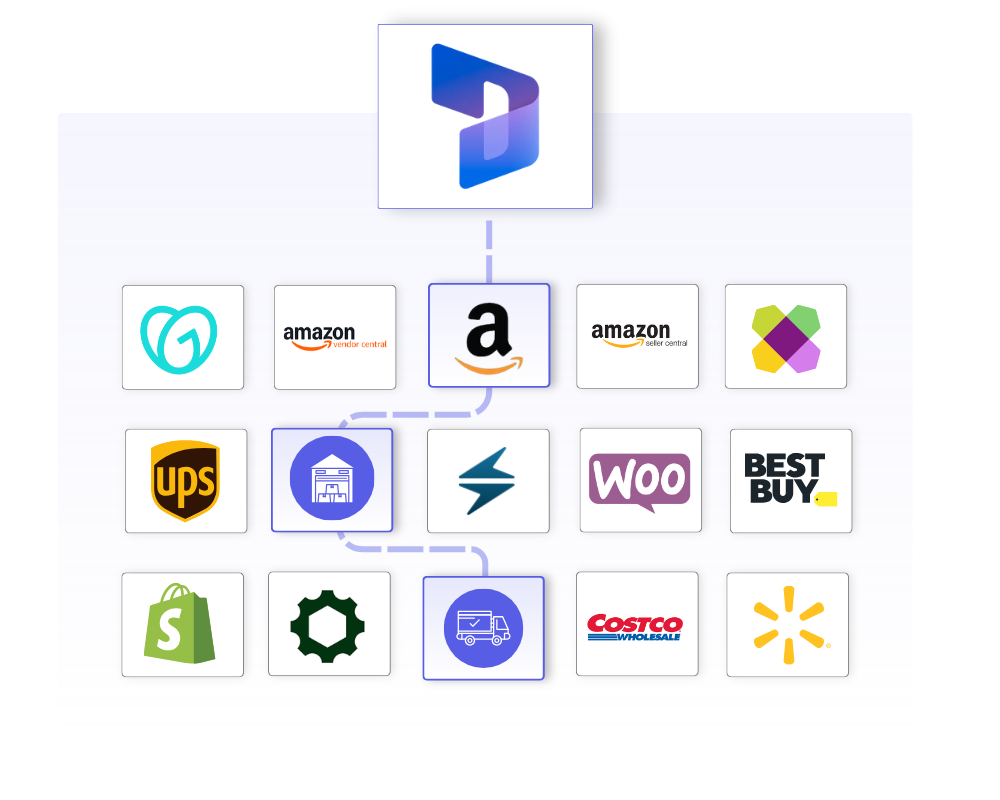
Dynamics 365 Order Management integrations using OrderEase, showing Dynamics 365  connected to eCommerce, marketplaces, retailers, logistics, and fulfillment partners through a centralized order orchestration layer.


D365 Purchase Order Workflow

Turn Customer Purchase Orders Into Sales Orders

Customer purchase orders do not arrive in a format Dynamics 365 can use.

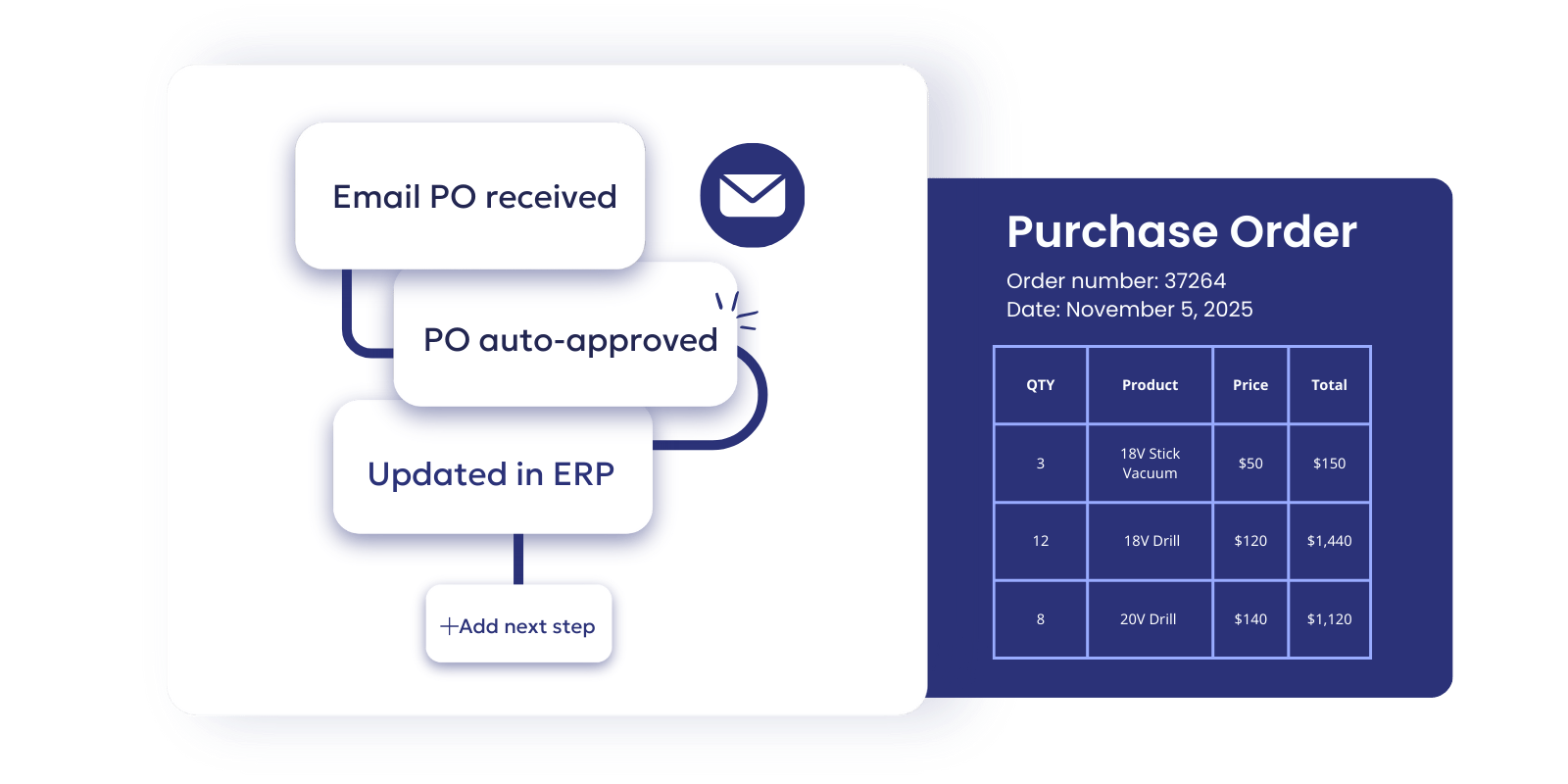
OrderEase captures incoming customer POs, extracts the order data, and converts them into structured sales orders ready for Dynamics 365. Required fields, pricing, and product data can be checked before the order is created.

What changes with OrderEase:

  • Customer POs are converted into sales orders automatically
  • Manual data entry from emails and attachments is reduced
  • Orders reach Dynamics 365 faster and in a usable format


Emailed POs synced to ERP using OrderEase for B2B Order Management-1
Dynamics 365 (1)
D365 Sales Order Workflow

Improve Dynamics 365 Sales Order Processing

Even after orders are created, processing them still creates friction.

OrderEase standardizes how sales orders are processed, validates order data against your rules, ensures consistency across orders, and reduces the need for manual corrections after entry.

What changes with OrderEase:

  • Sales orders are processed faster with fewer manual checks
  • Errors are caught before they create downstream issues
  • Order handling becomes consistent across every channel
  • Your team focuses on exceptions instead of routine fixes


D365 Sales Order Workflow

Improve Dynamics 365 Sales Order Processing

Even after orders are created, processing them still creates friction.

OrderEase standardizes how sales orders are processed, validates order data against your rules, ensures consistency across orders, and reduces the need for manual corrections after entry.

What changes with OrderEase:

  • Sales orders are processed faster with fewer manual checks
  • Errors are caught before they create downstream issues
  • Order handling becomes consistent across every channel
  • Your team focuses on exceptions instead of routine fixes


Dynamics 365 (1)

How It Works

From Incoming Order to D365-Ready Sales Order

Step 1

Capture orders from every channel

Instead of managing each source separately, OrderEase brings them into one process from the start.

Step 3

Validate before the order reaches Dynamics 365

Pricing, SKUs, required fields, customer-specific rules, and order completeness are checked before the order moves forward. 

Step 2

Extract and standardize the data

OrderEase converts that incoming data into a structured order format your team can actually work with.

Step 4

Create clean sales orders in Dynamics 365

Once the order is approved, it is pushed into Dynamics 365 as a structured sales order. 


Connect channels your team already runs

EDI

Automate inbound 850 purchase orders and outbound 855, 856, and 810 workflows. Manage partner-specific requirements without turning Dynamics 365 into an exception queue.

Email POs

Turn PDF, CSV, and spreadsheet attachments into structured sales orders. Customer POs move through a governed workflow before ERP sync.

B2B Portal

Capture customer orders through a controlled portal experience with the same validation logic used across every other channel.

Ecommerce

Normalize online orders before they enter Dynamics 365. Apply the same business rules to ecommerce that you apply to EDI and email order flows.


NetSuite logo, OrderEase Order Automation
Shopify - Horizontal Logo Resize
Walmart Marketplace (1)
UPS Logo - Horizontal
Rona Logo
QuickBooks logo
Williams Sonoma-1-1
Costco logo
Best Buy Logo-1
Lowes Logo 500 x 150
Ace_Hardware_Logo
SAGE 50 Logo
Shipwise logo
Kerridge  500x150
TractorSupplyCompanylogo
NetSuite logo, OrderEase Order Automation
Shopify - Horizontal Logo Resize
Walmart Marketplace (1)
UPS Logo - Horizontal
Rona Logo
QuickBooks logo
Williams Sonoma-1-1
Costco logo
Best Buy Logo-1
Lowes Logo 500 x 150
Ace_Hardware_Logo
SAGE 50 Logo
Shipwise logo
Kerridge  500x150
TractorSupplyCompanylogo
NetSuite logo, OrderEase Order Automation
Shopify - Horizontal Logo Resize
Walmart Marketplace (1)
UPS Logo - Horizontal
Rona Logo
QuickBooks logo
Williams Sonoma-1-1
Costco logo
Best Buy Logo-1
Lowes Logo 500 x 150
Ace_Hardware_Logo
SAGE 50 Logo
Shipwise logo
Kerridge  500x150
TractorSupplyCompanylogo
NetSuite logo, OrderEase Order Automation
Shopify - Horizontal Logo Resize
Walmart Marketplace (1)
UPS Logo - Horizontal
Rona Logo
QuickBooks logo
Williams Sonoma-1-1
Costco logo
Best Buy Logo-1
Lowes Logo 500 x 150
Ace_Hardware_Logo
SAGE 50 Logo
Shipwise logo
Kerridge  500x150
TractorSupplyCompanylogo
NetSuite logo, OrderEase Order Automation
Shopify - Horizontal Logo Resize
Walmart Marketplace (1)
UPS Logo - Horizontal
Rona Logo
QuickBooks logo
Williams Sonoma-1-1
Costco logo
Best Buy Logo-1
Lowes Logo 500 x 150
Ace_Hardware_Logo
SAGE 50 Logo
Shipwise logo
Kerridge  500x150
TractorSupplyCompanylogo

Business Impact

Better Order Intake in Dynamics 365

Improve how orders enter Dynamics 365 so your team spends less time fixing data and more time moving orders forward.

Reduce Manual Order Entry and Rework

Stop re-keying orders from emails, PDFs, and spreadsheets. Capture and convert incoming orders automatically so your team is not fixing the same issues inside Dynamics 365.

Prevent Order Errors Before They Reach D365

Validate pricing, SKUs, and required fields before orders are created. Catch issues early instead of correcting them after they affect fulfillment or customers.

Protect Data Quality in Dynamics 365

Ensure every order follows the same standards before it enters your ERP. Reduce mismatches, incomplete records, and reporting issues caused by inconsistent order data.

Process Orders Faster Across Every Channel

Handle orders from EDI, email, portals, ecommerce, and reps through one workflow. Remove delays caused by disconnected systems and manual handoffs.

Give Your Team Better Visibility Into Order Flow

Track how orders move from intake to ERP in one place. Identify issues faster and reduce time spent investigating order errors or delays.

Scale Order Volume Without Adding Headcount

Process more orders without increasing manual work. Support growth without expanding the same back-office tasks that slow your team down.


Frequently Asked Questions About Dynamics 365 Order Processing

Does OrderEase replace Dynamics 365?

No. Dynamics 365 remains your ERP and system of record. OrderEase improves what happens before the transaction by capturing incoming orders, validating them, and converting them into structured sales orders before they reach the ERP.

Can OrderEase turn customer purchase orders into sales orders automatically?

Yes. OrderEase can process customer POs from email attachments, spreadsheets, EDI, portals, and other order channels, then convert that data into structured sales orders for Dynamics 365. This reduces manual entry and helps your team move faster with fewer errors.

Is this built for accounts payable or procurement teams?

No. OrderEase is built for order operations teams that need to manage customer order intake more efficiently. It is not an AP automation or vendor invoice processing tool.

Can OrderEase handle more than one order channel?

Yes. OrderEase is designed for multi-channel order intake. It helps you manage orders from EDI, email, portals, ecommerce, and rep-assisted workflows in one process before they enter Dynamics 365.

Stop Sending Raw Orders Into Dynamics 365

See how OrderEase captures customer POs from every channel, validates them before ERP, and turns fragmented intake into clean sales orders your team can trust.

Let's Discuss Your Integration Needs