




.png?width=250&name=OrderEase%20logo%2c%20Square%20(2).png)


On this page
Subscribe for updates
Keep up with OrderEase and access industry-leading order operation insights.
B2B customer portals were once straightforward wholesale websites where customers could browse catalogs and place orders.
But that model breaks down quickly at scale. As B2B businesses add sales channels, customer segments, and fulfillment complexity, the portal stops being a solution and starts becoming a liability.
Many portals are still designed like B2C storefronts, optimized for browsing and checkout. Without deep integration with inventory and fulfillment systems, these portals create inconsistency rather than efficiency.
For B2B sellers, the problem isn’t whether a customer portal exists. It’s whether that portal within an order system is capable of governing how every order behaves, regardless of where it starts.
What is a B2B Customer Portal: The Traditional Approach
B2B customer portals were designed to digitize existing processes, not reinvent them.
They mirrored printed catalogs, but with a digital interface that lets customers log in, select SKUs, and submit an order. It moved most buyers away from phone calls, fax machines, and emailed purchase orders.
This approach was effective when sales environments were simple. Orders came through a single portal, pricing was straightforward, and fulfillment was managed manually. The portal only needed to capture orders, not understand broader business operations.
Many portals today are still built on this same model, even though the structure of B2B selling has changed dramatically.
Traditional Customer Portal Features
While the “wholesale website behind a login” model is outdated, traditional B2B portal features remain important. They provide a foundation for shifting buyers from email to a consistent ordering workflow.
Here are the traditional portal features most businesses still need, and what they actually enable:
Customer Login + Account Management
The portal needs to recognize the buyer and the account they belong to. That’s what makes B2B different from a public e-commerce store. Once a customer logs in, the portal should display the correct products, pricing, and terms for that account.
Key functionality often includes:
-
Product lists by category
-
Search by SKU/name
SKU + Quantity Order Entry
At a minimum, buyers need an easy way to browse or search SKUs, eliminating the need to reference PDFs or exchange product lists via email.
Most traditional portals support:
-
Add-to-cart ordering
-
Order notes or PO number entry
Basic Pricing Logic
Traditional portals typically support the basics:
-
Simple price lists or customer tiers
-
Discounts by account type
Simple Checkout Rules
Most suppliers require basic structure to prevent incomplete orders. Portals typically include safeguards to ensure orders meet essential requirements:
-
Minimum order value / minimum quantity
-
Requested ship date field
Order Confirmation + Email Notifications
Once an order is placed, customers need reassurance it went through. Traditional portals confirm submission and:
-
On-screen order confirmation
-
Email confirmations to the buyer
-
Sometimes, internal notifications to your team
Order History + Reordering
This is where portals become genuinely valuable for buyers. In B2B, purchase patterns repeat. If customers can see past orders and reorder in one click, they’re more likely to actually use the portal instead of reverting back to email.
Most portals support:
-
Viewing past orders
-
Reordering from history
-
Copying an order into a new cart
Basic Account Self-Service
Traditional portals often include light “account lookup” functionality:
-
View invoices (sometimes)
-
View open orders or backorders (sometimes)
-
Download statements or confirmations (occasionally)
With multiple ordering channels and complex pricing agreements, the portal must do more than provide a login and cart. It should operate within a system that standardizes and coordinates orders across the business.
Why Many B2B Customer Portals Still Don’t Match How Buyers Purchase
B2B buying has never been as simple as B2B e-commerce.
B2B buyers do not shop each time they order. They reorder from saved lists, place partial orders based on availability, and often call or email to negotiate pricing. When a portal does not support these behaviors, buyers find workarounds. Email and phone calls persist not due to resistance to technology, but because these channels accommodate nuance and exceptions. As a result, many suppliers maintain a B2B portal yet still process some orders manually. The portal exists, but does not align with actual customer workflows.
As B2B businesses grow, the primary challenge shifts from capturing orders to coordinating them effectively.
Orders arrive through customer portals, email attachments, inside sales teams, EDI connections, marketplaces, and retailer systems. Each has its own formats and expectations.
Simultaneously, backend systems become more complex. ERPs manage operations and accounting, WMSs oversee inventory and fulfillment, and 3PL providers add further requirements. These systems do not connect natively and require consistent data.
In B2B sales, capturing orders is only the first step. Each order must match pricing agreements, reflect accurate inventory from the ERP and warehouse, and be structured correctly for fulfillment. A single B2B customer portal cannot manage all these requirements alone.
When a portal operates outside an orchestration layer, portal orders behave differently from those in other channels. This leads to pricing discrepancies, inventory misalignment, and increased manual reconciliation by customer service. As order volume grows, headcount costs can outpace profitability.
The wholesale website model treats ordering as an isolated transaction, when in reality it’s one step in a complex, interconnected process.
The Modern B2B Customer Portal: From Storefront to Operating Interface
For high-volume B2B sellers, a customer portal can no longer function as a standalone storefront. It has to operate within an orchestration layer that governs how orders move through the business.
This does not mean the portal replaces the ERP, WMS, or other backend platforms. Instead, the portal should connect to these systems and channels.
The distinction matters. When portals are connected to a unified order layer, they become powerful. When they live in isolation, they become another login for your team to monitor.
What Today’s B2B Sellers Need From a Customer Portal
When connected to an orchestration layer, a portal transitions from a basic ordering tool to an operational interface.
Modern B2B portals make ordering predictable and allow customers to purchase without generating additional manual work for internal teams.
ERP + Fulfillment Integrations
A portal can’t facilitate accurate ordering if it’s disconnected from your inventory.
Modern portals need deep integration into the operational stack, especially ERP, so pricing, inventory, and order structure reflect how the business runs. Otherwise, the portal becomes an interface that creates problems the moment the order leaves the screen.
Look for portals that have multiple ERP integrations. Lots have 1-2 connections, not an ecosystem. The reality is that your business will not stick to a single accounting system or ERP as you grow.
Multi-Channel Order Capture
Today’s B2B sellers don’t live in a world where every order starts inside a customer portal.
Some customers will order through sales reps. Major retailers will enforce EDI. Ecommerce may still run through platforms like Shopify. And some customers will never stop sending POs.
A modern portal assumes this reality, so you aren’t running two parallel worlds: “clean portal orders” and “manual everything else.”
Email PO + Attachment Intake
Even the best portal doesn’t eliminate email overnight. Customers still send purchase orders as PDFs and spreadsheets, meaning your system needs a way to capture those email attachments, interpret the order details, and normalize them into the same flow as other orders.
If email orders stay outside the system, you just shift where the work shows up.
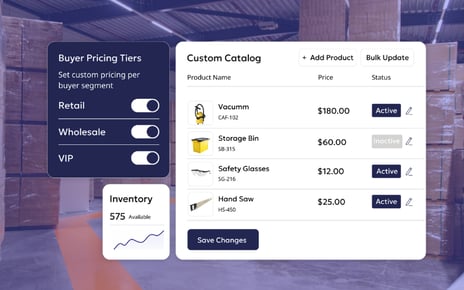
Customer-Specific Pricing
In modern B2B, pricing isn’t “10% off tier 2.” It’s agreements, exceptions, volume breaks, and customer rules that live in operational systems. A modern portal reflects real pricing logic, so teams stop fixing pricing after the order has already been submitted.
Availability That Reflects Fulfillment Constraints
Customers need to know which products are available and can be shipped right now. Modern portals surface inventory and availability in a way that reflects reality: what’s available now.
Reordering Tools Built for Repeat Buying
Modern portals make repeat ordering the fastest path: reordering from history, saved lists, common order templates, and quick-entry flows that match how buyers already operate. Adoption improves when the portal is genuinely faster than email.
Ordering Guardrails That Prevent Broken Orders
Modern portals include safeguards to prevent issues before they reach your team, such as minimums, pack rules, ship date logic, restricted items, delivery constraints, and account-specific ordering rules.
Rather than relying on manual corrections, the portal ensures order validity at the point of entry.
The first steps to transition to a modern, integrated portal
A common mistake is attempting to upgrade the portal before standardizing underlying processes.
1) Audit how orders really enter your business
List all order sources, such as:
-
portals
-
email POs
-
spreadsheets
-
sales reps
-
EDI
-
marketplaces
-
retailer portals
Identify where each source fails or requires ERP rework. This establishes a clear baseline of current portal limitations.
2) Define your “order standard” before you touch the portal
A modern portal is effective only if every order adheres to the same rules. Document what constitutes a valid order, including:
-
pricing logic
-
product eligibility
-
pack and quantity rules
-
minimums
-
routing rules
-
exception handling.
Without explicit rules, the portal can mask inconsistencies.
3) Build the integration foundation around ERP + fulfillment truth
The priority is ensuring the portal reflects the same data and processes as your operations team. The portal should draw from systems of record and submit structured orders to minimize downstream corrections.
4) Normalize non-portal orders into the same flow (especially email)
The modern approach assumes some orders will always arrive from multiple sources. The key is to stop running parallel workflows and instead standardize all orders into a single pipeline.
5) Pilot with one segment, prove the flow, then scale adoption
Begin with a customer group that is eager for digital ordering. Once stable, expand to additional segments, products, and channels without disrupting operations.
The Five Types of B2B Customer Portals
The Order Ecosystem–Connected Portal
What it is:
In this approach, the portal is designed as part of a broader order management ecosystem. It assumes orders will originate from many sources (portal, email, reps, EDI), with orders normalized before they reach the ERP. The portal becomes your wholesale catalog for B2B buyers, while connecting to other ways partners order. Independent retailers and distributors can use the portal, while big-box stores enforce EDI, and your B2C storefront lives on Shopify. With a modern order management system, all of them exist in a standardized order flow.
Who it’s for:
High volume sellers managing B2B, or B2B and B2C operations
What it typically includes:
-
A buyer portal for wholesale ordering
-
Connected intake from other sources
-
Order validation before ERP
-
Consistent pricing + inventory logic
-
Visibility and exception handling
Pricing:
Pricing for these solutions is typically tied to order volume, complexity, or integration depth — reflecting the operational value they deliver rather than just the UI they provide.
This is the approach B2B eCommerce platforms like OrderEase are built for: connecting a built-in B2B customer portal to the systems and channels that drive real-world order operations. Every order follows the same rules, regardless of where it starts.
The E-commerce-First B2B Portal
What is it:
An e-commerce-first B2B portal is essentially a B2C storefront adapted for wholesale buying. It’s built for product discovery and checkout, with a familiar “add to cart” experience.
Features:
-
A searchable online catalog with merchandising tools
-
Customer accounts + buyer permissions
-
Quick reordering + saved carts/lists
-
Promotions and basic checkout logic
-
Light integrations
Who it’s for:
High-volume B2C sellers
Pricing:
Pricing for these portals often scales with order volume or platform tiers.
Why it works:
These portals are fast to launch, feel modern, and deliver a modern buying experience site.
Where it breaks down:
In most B2B operations, the portal is rarely the sole ordering channel. When orders also arrive via sales representatives, email POs, EDI, or marketplaces, the ecommerce-first portal becomes just one of several entry points, rather than the system of record.
The ERP-Attached Self-Service Portal
What it is:
An ERP-provided self-service portal is a customer portal that comes from your ERP vendor, delivered as a native module. Its primary purpose is to expose ERP-held data to customers in a secure, self-serve interface.
Who it’s for:
Companies using an ERP that want to give customers self-service access without introducing a new system for their team to learn.
What it typically includes:
-
Invoice access and payment history
-
Order history
-
Account balances/statements
-
Light account details
-
Basic reordering (depending on the ERP module)
Why it works:
For companies already invested in their ERP, this option is often easier to justify internally due to existing licensing.
How pricing usually works:
Pricing is often tied to ERP licensing, user counts, or sold as an add-on module.
Where it breaks down:
These portals excel at capturing orders and reflecting data, but they’re limited when it comes to coordinating what should happen next.
Once orders span multiple channels, teams spend hours reconciling discrepancies and manually steering orders through the real-world process.
The Lightweight Order Entry Portal
What it is:
A lightweight order entry replaces phone and email orders, giving customers a quick way to place orders digitally. These portals prioritize order submission and basic pricing logic.
Who it’s for:
Growing B2B sellers who want to modernize ordering quickly.
What it typically includes:
-
Fast SKU/quantity order entry
-
Basic customer pricing or price lists
-
Simple customer logins and account access
-
Lightweight integrations with accounting tools or entry-level ERPs
-
Minimal workflow complexity by design
Why it works:
For smaller teams, this model delivers quick wins. It reduces manual order intake and helps operations move faster without a major implementation effort.
Where it breaks down:
As order complexity increases, these portals hit a ceiling. They weren’t built to manage multichannel orders, advanced pricing, or operational orchestration.
Choosing the Right B2B Customer Portal for Your Business
The success of a customer portal isn’t measured by feature adoption. It’s measured by operational outcomes:
-
Manual corrections decline
-
Pricing disputes become rare
-
Customer service shifts from reactive cleanup to proactive support
-
Internal teams trust the data flowing through the system
Choosing a portal isn’t about aesthetics. It’s about aligning with where your customers are.
How to Evaluate and Select the Right B2B Customer Portal Vendor
The most important thing to understand when evaluating portal vendors is that you’re not selecting a “website.” You’re selecting an interface that will either reduce complexity or quietly multiply it.
1) Evaluate portal vendors based on operational fit, not UI polish
A portal can look modern and still be operationally expensive. It needs to fit the way your business actually sells and fulfills. That includes customer-specific pricing, repeat ordering behavior, ordering guardrails, and downstream workflows that can’t be broken without creating manual cleanup.
If your team already spends time correcting orders, reconciling pricing issues, or managing customer expectations after checkout, a portal that simply “captures orders” won’t help much. It will just shift the cleanup work further downstream.
2) Pressure-test the vendor on omnichannel reality
B2B orders come from multiple sources in endless formats. And if you sell across B2B and B2C, you may already have a separate storefront running elsewhere.
That means the portal you choose can’t assume it’s the only order entry point. If the vendor’s model depends on forcing customers into a single channel, you’ll end up running two parallel worlds: “portal orders” and “everything else.”
The strongest portal vendors are designed around omnichannel behaviour.
3) Don’t settle for “ERP integration” as a checkbox
Nearly every vendor will say they integrate with your ERP. The difference is how.
Some vendors offer integrations that keep orders and inventory aligned with your system of record. Others rely on one-off point-to-point projects that become hard to maintain the moment your business changes.
This matters because portals fail when they create their own version of truth. If your portal shows pricing or availability that your ERP can’t process, it becomes a discrepancy engine. Your team will spend time fixing issues rather than scaling operations.
4) Ask where pricing logic lives
Pricing is where most portals quietly break.
A portal vendor should be able to model pricing complexity without turning it into an ongoing manual maintenance job. If the only way to support real pricing is custom logic or constant admin work, you’ll feel it immediately in disputes, credits, and margin erosion that’s hard to trace back to the portal itself.
Good portals enforce pricing logic consistently, in a way that stays connected to the systems that govern financial truth.
5) Choose a vendor that reduces integration sprawl
One of the highest long-term costs of a portal isn’t licensing. It’s the ecosystem you have to build around it to keep it functioning.
If the vendor requires you to stitch together custom point-to-point integrations between the portal, ERP, WMS, shipping tools, and other systems, you’ll end up with a fragile architecture that becomes harder to change every quarter.
The most scalable approach is a portal that sits within an order ecosystem, with logic centralized and systems connecting in a governed way. That’s how operations teams avoid “integration theater” and get to what they actually want: orders that behave consistently regardless of where they start.
Scalable Order Operations Start With Your B2B Customer Ordering Portal
As channels, volume, and exceptions increase, the portal must be part of a larger system that can coordinate orders across sources.
At scale, the wrong customer portal doesn’t simply fail to help; it actively creates work. It introduces inconsistencies that teams manually compensate for, hides operational gaps until customers feel them, and slows the business precisely when speed and accuracy matter most. Choosing a portal is no longer just a digital experience decision. It’s an operational strategy choice, whether teams treat it that way or not.
Frequently Asked Questions
What is a B2B customer portal?
A B2B customer portal is a secure interface where business customers interact with ordering, pricing, and account information. In modern environments, it serves as the buyer-facing edge of an integrated order ecosystem.
How much does a B2B customer portal cost?
Costs vary widely based on integration depth and operational scope. Portals become expensive when they’re expected to compensate for fragmented order systems.
How do you create and implement a B2B customer portal?
Successful portals are designed around order workflows first, UI second. Many teams pilot with a specific channel or customer segment before scaling.
How do you integrate a custom B2B portal with ERP systems?
The ERP should remain the system of record. Portals work best when they exchange structured data through defined interfaces rather than embedding business logic at the presentation layer.
How do you sell wholesale with a B2B portal?
A portal should support repeat ordering, negotiated pricing, and assisted buying — while coexisting with other order channels.
How can a B2B portal automate non-EDI order processing?
By treating email, spreadsheet, and portal orders as equal inputs into a standardized order flow, allowing non-EDI orders to be captured, normalized, and synchronized automatically. Some platforms, including OrderEase, treat email POs and spreadsheets as first-class order inputs, capturing and normalizing them into the same flow as portal and EDI orders.
How can we ensure seamless integration between the portal, ERP, and other backend systems?
The most reliable way to get “seamless integration” is to stop treating integration like a wiring project. Point-to-point connections can move data between systems, but business logic ends up scattered. A better approach is to add an order management system that standardizes how orders are created, validated, and updated before they reach your ERP or fulfillment stack.
.png?width=200&height=200&name=OrderEase%20Logo%2c%20Square%20(1).png)
Self‑Service Ordering for Your Buyers
Give your buyers 24/7 access to your catalog, negotiated pricing, and real‑time inventory visibility. With OrderEase, customers log in, search and browse your products, and submit accurate, structured orders anytime, from any device.