


Orchestrates how orders flow through Sage 50. Preconfigured, not coded.


.png?width=300&name=Walmart%20Marketplace%20(1).png)


.png?width=300&name=Walmart%20Marketplace%20(1).png)


.png?width=300&name=Walmart%20Marketplace%20(1).png)


.png?width=300&name=Walmart%20Marketplace%20(1).png)


.png?width=300&name=Walmart%20Marketplace%20(1).png)


How OrderEase Works with Sage 50
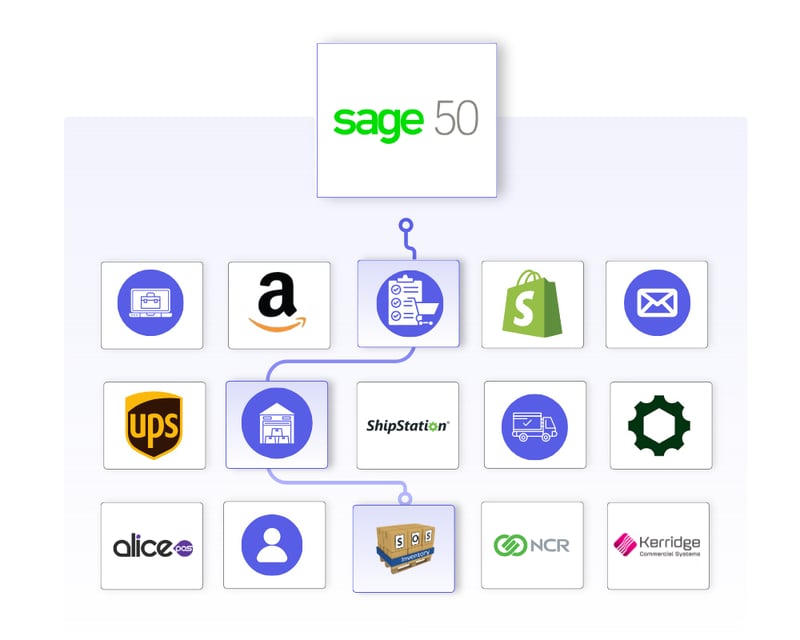
OrderEase orchestrates the full order lifecycle around Sage 50. Orders are captured from connected sales channels, validated against your business rules, and structured to match your Sage 50 configuration before they are created as transactions.
Fulfillment status and invoicing signals are coordinated across connected systems without introducing channel-specific logic into Sage 50. This allows Sage 50 to remain the system of record while OrderEase manages upstream complexity and variability.

|
Preconfigured IntegrationsThis is not a build-your-own integration. OrderEase delivers prebuilt, maintained Sage 50 connections with standardized workflows out of the box. |
Who This Integration Is For
Built for teams managing orders across multiple sources where order structure, timing, and business rules vary by channel. OrderEase manages upstream complexity so Sage 50 can remain stable as the system of record.
Existing Sage 50 workflows, configurations, and downstream processes stay intact while channel-specific logic is managed by OrderEase, without custom scripts, middleware, or ERP redesign.
Sage 50 ↔ OrderEase
What This Means for Your Business
OrderEase controls how orders are created in Sage 50, making order volume easier to manage.
Reduce manual intervention
Problems are surfaced and resolved before orders reach the ERP. Sage 50 admins and operations teams deal with fewer cleanup tasks and manual fixes.
Existing Sage 50 workflows
Existing Sage 50 workflows continue to work as expected. New order sources do not introduce unexpected behavior or require constant adjustment.
Easier onboarding of new channels
New retailers, marketplaces, and partners can be added without changing Sage 50 configuration. Onboarding takes less time and creates less internal disruption.
Fewer ERP-driven projects
Order-related changes no longer turn into Sage 50 projects. Teams avoid repeated cycles of customization, testing, and regression fixes tied to order intake.
Correct orders in Sage 50
Orders enter Sage 50 in a usable state. Teams spend less time fixing pricing issues, missing fields, and structural errors after orders are created.
Predictable day-to-day operations
Order volume can increase without creating operational fire drills. Teams know what to expect from Sage 50 because variability is handled upstream.
Featured Sage 50 Integrations
Discover More IntegrationsExplore our full integration marketplace and see how OrderEase connects your ERP to the channels, marketplaces, and systems you rely on. |
Common Sage 50 Order Management Use Cases
Order Intake & Standardization
Orders from ecommerce, sales reps, and B2B portals are captured and standardized into a single operational model before reaching Sage 50.
Upstream Order Validation
Customer eligibility, product availability, pricing, quantities, an
Operational Visibility Outside ERP
OrderEase provides visibility into order flow, fulfillment status, and invoicing without forcing Sage 50 to act as an operational dashboard.
Scaling Order Volume
Orders are mapped to your existing Sage 50 configuration without requiring ERP redesign.
Configured Sage 50 Sync Settings
Control how and when orders flow into Sage 50 when they are ready and in the correct state.
Use Sage 50 Pricing for Orders
If you would like Sage 50 to always override the prices and not keep the prices as seen on the orders in our system
Push Sage 50 on Status
This setting allows you to specify if orders should push down to Sage 50 on a different status, allowing for actioning on an order versus submitting it immediately upon submission
Override Default Shipping
Used to override the Sage 50 shipment defaults on order push
Default Order Number
If Sage 50 does not generate unique sales order numbers, this setting lets OrderEase push its own SO number to prevent duplicates
Remove Zero Quantity
If using "confirmed" status in OE for orders, this setting lets our Sage 50 integration remove any SKUs on the order push to Sage 50 that have confirmed quantity as zero
Specific Customers
If using OE to pull orders from Sage 50 and create them in our system, this setting lets the user specify what customers OE should actively pull orders for
Custom Fields
Select a Sage 50 field and decide the data that should be pushed in
Select which Sage 50 locations OrderEase uses for inventory checks, so availability is accurate and orders are routed correctly from the start.
Allowed Locations
Select all applicable locations you would like us to bring in inventory from in our system
Default Locations
Choose a location as a default location if a customer does not have location assignments done in Sage 50
Control which customers are synchronized so only relevant accounts are included.
Sync Active/Inactive Customers
If this setting is turned on, OE will actively remove customers from our system that are marked inactive on Sage 50 after the initial OE import
Customer Types
Select what customer types to bring into OrderEase from Sage 50, companies or individuals
Customer Statuses and Categories
Further options to specify what customers OE should bring in from Sage 50
Exclude Customers From Integration
With the Sage 50 customer id, you can ask us not to bring in that customer, or its ship-to records
Sync Only Customers
OE will only bring in these specific customers and no other ones
Sales Rep Mapping
Automate sales rep assignments from Sage 50 to OrderEase
Custom Fields
Select a NetSuite field and decide the data that should be pushed in.
Define how product data attributes flow so catalogs stay accurate and aligned with your ERP.
Sync inactive products
Bring in products from Sage 50 that are marked inactive into our system
Product Types to Pull
Specify the product types OrderEase should bring in from Sage 50
Currency Code
This is the currency code that will be used to pull pricing into OE
Customer Fields
Maps a custom Sage 50 field from products to the OrderEase product "category" field
Product Features Mapping
Allows for OrderEase-created product features to be mapped to Sage 50, such as Color, Size, Brand, Ingredients
Specific Customers
If using OE to pull orders from NetSuite and create them in our system, this setting lets the user specify what customers OE should actively pull orders for
Custom Fields
Select a NetSuite field and decide the data that should be pushed in.
Unify shipment and fulfillment data so shipping activities stay aligned across systems.
Create Item Fulfillments
Allows OrderEase to push shipments from our system to Sage 50
Include Shipping Cost
Includes shipping cost from OrderEase, mapped to Sage 50 shipments
Create Shipment in OrderEase
Pulls shipments from Sage 50 to create in OE
Custom Field Mappings
Allow custom field mappings on shipment/fulfillment creation in Sage 50
Ensure invoice and tax data flows cleanly between Sage 50 and OrderEase for accurate billing.
Create Invoices in OrderEase
Pulls invoices from Sage 50 into OrderEase
Pull Taxes from Sage 50
Pull taxes from Sage 50 to OrderEase
Frequently Asked Questions About Sage 50 Integrations
Sage 50 handles core accounting and inventory but does not manage multi-channel order intake on its own. Orders from ecommerce, EDI, sales reps, and email need a layer that standardizes them before they reach Sage 50.
Not natively. Sage 50 is an accounting and inventory system rather than a full order management system. OrderEase adds the order orchestration layer that Sage 50 does not include.
An EDI solution needs to translate, validate, and structure transactions before they enter Sage 50 as clean records. OrderEase handles partner mapping, validation rules, and document automation outside the ERP so channel-specific complexity does not get pushed into Sage 50.
OrderEase connects to Sage 50 through a prebuilt integration that synchronizes products, inventory, customers, pricing, orders, shipments, and invoices. Data flows are structured and standardized, with configurable sync timing and validation rules.
Yes. Orders reaching a configured status in OrderEase push to Sage 50 in real time. Products, inventory, and customers sync on a scheduled and manual basis.
OrderEase validates customer eligibility, product availability, pricing, and required fields before an order reaches Sage 50. A default order number setting also prevents duplicate sales order numbers when Sage 50 does not generate unique ones.


.png?width=250&name=OrderEase%20logo%2c%20Square%20(2).png)