


Orchestrates how orders reach Spire. Preconfigured, not coded.


.png?width=300&name=Walmart%20Marketplace%20(1).png)


.png?width=300&name=Walmart%20Marketplace%20(1).png)


.png?width=300&name=Walmart%20Marketplace%20(1).png)


.png?width=300&name=Walmart%20Marketplace%20(1).png)


.png?width=300&name=Walmart%20Marketplace%20(1).png)


How OrderEase Works with Spire
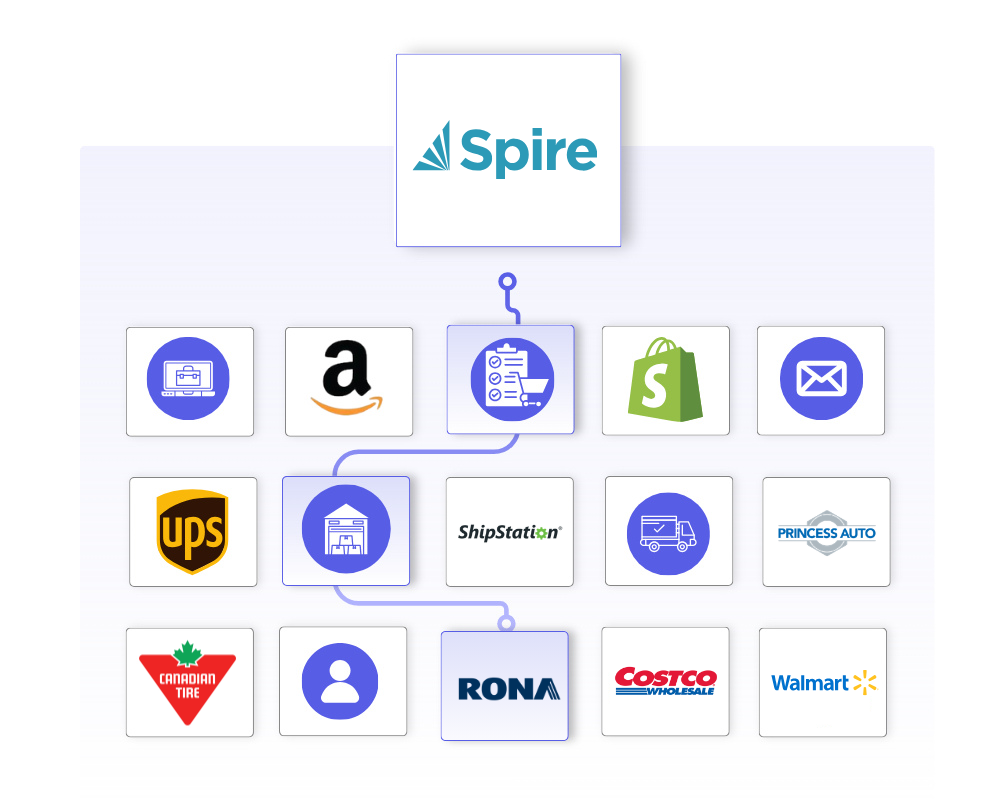
OrderEase orchestrates order intake around Spire. Orders are captured from connected sales channels, validated against your business rules, and structured to match your Spire configuration before they are created as sales orders, bookings, quotes or RMAs.
Spire runs on your own server or in Spire's cloud, so the integration runs in two halves. A cloud service holds your configuration. A Windows service on your side talks to the Spire REST API directly, and updates itself. Customers, items, inventory, pricing, invoices, shipments and purchase orders move on schedules you control, and order status flows back through Spire phases. Spire stays the system of record while OrderEase manages the channel-side complexity around it.

|
Preconfigured IntegrationsThis is not a build-your-own integration. OrderEase delivers a prebuilt, maintained Spire connection with standardized workflows, an installer for your Spire server, and automatic updates. |
Who This Integration Is For
This Spire integration is built for suppliers, distributors and manufacturers taking orders from more than one place, where order structure, timing and rules change by channel. OrderEase manages that variation so Spire can stay stable as the system of record.
Your existing Spire setup stays intact. Warehouses, price levels, terms codes, sales rep codes and user-defined fields are mapped to what you already have, so channel-specific logic lives in OrderEase instead of turning into custom Spire work.
Integration Data Flow
Spire ↔ OrderEase
| Direction | Trigger | Frequency | |
|---|---|---|---|
| Customers | Spire→ OrderEase | Customer created or updated in Spire | Daily scheduled + manual sync |
| Products and pricing | Spire → OrderEase | Item, price level or pricing matrix change in Spire | Daily scheduled + manual sync |
| Inventory | Spire → OrderEase | Quantity change in Spire | Daily scheduled + manual sync |
| Orders | OrderEase → Spire | Order reaches the status you configure | Pushed on event |
| Shipments | Spire → OrderEase | Picking slip posted in Spire | Sync every 30 minutes |
What This Means for Your Business
OrderEase controls how orders are created in Spire, so order volume gets easier to manage.
Fewer re-keyed orders
Channel orders are created in Spire as sales orders instead of being typed in a second time. The order desk stops copying line items out of email, portals and marketplace dashboards.
Spire stays the system of record
Accounting, inventory and pricing keep living in Spire. OrderEase reads from it and writes back to it rather than replacing it.
Easier onboarding of new channels
New retailers, marketplaces and stores are added in OrderEase. Your Spire company, warehouses and price levels do not change.
Problems surface before Spire sees them
Customer, SKU, price and quantity are checked upstream. Fewer sales orders need correcting or crediting after the fact.
On-premise Spire is support
Spire does not have to move to the cloud for this to work. A Windows service on your own server connects to the Spire REST API and keeps itself updated.
Predictable day-to-day operations
Order volume can rise without a fire drill. What Spire receives stays consistent because the variation is handled upstream.
How OrderEase Connects Ecommerce Orders to Odoo
Discover More IntegrationsExplore the full integration marketplace and see how OrderEase connects Spire to the channels, marketplaces and systems you rely on. |
Common Spire Use Cases
Order Intake Standardization
Orders from EDI, ecommerce, sales reps and B2B portals are captured and standardized into one operational model before they reach Spire.
Upstream Order Validation
Customer eligibility, product availability, pricing, quantities and required fields are checked before the order moves forward. Spire's own credit limit can be enforced or overridden per push.
Warehouse and Price Level Mapping
Multi-warehouse inventory maps to per-warehouse SKUs, and Spire pricing levels become buyer groups that control what each customer sees and pays.
Operational Visibility Outside the ERP
Order flow, fulfillment status and invoicing are visible in OrderEase, so Spire does not have to double as an operations dashboard for people who do not have a Spire licence.
Configured Spire Sync Settings
Point OrderEase at the right Spire company and keep the connection under your control.
Spire URL and Company
The address of your Spire server and the company database OrderEase connects to.
API User Credentials
A dedicated Spire user with API permissions, so the connector's activity is separable from a person's.
Disable Automatic Updates
Hold the connector on its current version when your IT team wants to schedule the upgrade themselves.
Control which Spire customers come across and how their addresses and reps are handled.
Customer Statuses to Pull
Choose whether active, prospect and inactive customers are brought into OrderEase.
Sales Rep Mapping
Match a Spire salesperson code to an OrderEase user, so orders arrive attributed to the right rep.
Filter Duplicated Addresses
Collapse ship-to addresses that are the same address written twice.
Customer Field Mappings
Map Spire user-defined fields to OrderEase customer fields.
Define what catalog data flows and which warehouses it comes from.
Default Warehouse
Sets the warehouse OrderEase treats as primary. Chosen once at setup and locked afterwards.
Warehouses to Pull From
Select the additional Spire warehouses whose inventory should appear in OrderEase.
Product Statuses to Pull
Bring in active, on hold or inactive items.
Product Fields to Pull
Choose which Spire item fields populate the OrderEase catalog.
Use Calculated Inventory
Publish on hand minus committed instead of the raw available figure.
Sync Images
Pull product images from Spire on their own schedule.
Control how and when orders are created in Spire, in the state you want them.
Push Orders on Status
Decide which OrderEase status triggers the push, so orders can be actioned before they land rather than the moment they are submitted.
Use Spire Pricing for Orders
Let Spire's price win over the price shown at the time of ordering.
Use Spire Shipping Address
Take the ship-to from the Spire customer record instead of the order.
Order Type Mapping
Map each OrderEase order type to a Spire type. Wholesale to sales order, booking to booking, quote to quote, credit note to RMA, standing to standing.
Warehouse Mapping
Route each OrderEase warehouse to the matching Spire warehouse.
Set Confirmed Quantity to Zero
Push the order without committing stock, for teams that allocate in Spire.
Keep shipping activity aligned in both directions.
Pull Shipments
Create OrderEase shipments from Spire picking slips, from a date you set.
Pull Partial Shipments
Keep the order open across multiple shipments instead of closing it on the first one.
Create Shipments in Spire
Push shipments raised in OrderEase back into Spire.
Transition Order to Shipped
Move the OrderEase order to shipped once the Spire shipment arrives.
Include Shipping Cost
Carry freight through to the Spire document.
Keep invoice and tax data consistent between the two systems.
Create Invoices in OrderEase
Pull Spire AR invoices in, from a date you set.
Pull Taxes and Tax Mappings
Bring Spire tax codes across and map each one to an OrderEase tax type.
Push AR and AP Invoices to Spire
Send invoices raised in OrderEase to Spire, with a default expense account for AP.
Customers to Pull Invoices For
Limit the invoice pull to specific accounts.
Pull Invoices Without an Order
Bring in Spire invoices that have no matching OrderEase order.
The mappings that make the connector fit an existing Spire install rather than the other way around.
Spire Phase Mapping
Map each Spire phase to an OrderEase order status event, so warehouse progress in Spire shows up for the buyer.
Order and Order Line Custom Fields
Map Spire UDFs at header and line level to an OrderEase field, a tag or a fixed value.
Shipping Method Mapping
Match OrderEase shipping methods to Spire shipping method codes.
Credit Notes and Credit Limit Override
Turn credit note push on, and decide whether a push can exceed the customer's Spire credit limit.
Remove Zero Qty
If using “confirmed” status in OE for orders, this setting lets our NetSuite integration to remove any SKUs on the order push to NetSuite that have confirmed qtys as zero
Specific Customers
If using OE to pull orders from NetSuite and create them in our system, this setting lets the user specify what customers OE should actively pull orders for
Custom Fields
Select a NetSuite field and decide the data that should be pushed in.
Frequently Asked Questions About Spire Integrations
A Spire ERP integration connects the systems you sell through to the system you run your business on, so orders, customers, inventory, pricing and invoices move between them without anyone typing them twice. OrderEase sits upstream of Spire. It captures orders from EDI, ecommerce, marketplaces, wholesale portals and emailed POs, checks them against your rules, and creates them in Spire as the right document type. Spire remains the system of record for accounting and inventory.
Yes. OrderEase translates and validates EDI transactions, including 850 purchase orders, 855 acknowledgements, 856 ASNs and 810 invoices, then creates the resulting sales order in Spire. Partner mappings, validation rules and exception handling are managed in OrderEase, so retailer-specific requirements do not turn into custom work inside Spire.
Through Spire's REST API, using a Spire user account you create with API permissions. Because Spire can run on your own server, the integration has two halves. A cloud service holds your configuration, and a Windows service installed on the Spire side makes the API calls, runs the scheduled jobs and processes events. It is installed once from a standard installer and updates itself after that.
It depends on the object, and you set it. Orders push to Spire as soon as an order reaches the status you configure. Shipments and invoices pull every 30 minutes by default, purchase orders and order status every 15 minutes, inbound orders hourly, and customers, products and inventory once a day overnight. Every one of those schedules is editable per job, and you can trigger any of them manually.
No. The integration supports Spire running on your own Windows server as well as in Spire's cloud. On-premise installs need a Windows machine that can reach both Spire and the internet, and a firewall rule allowing outbound calls to OrderEase.
No custom development, and no changes to how Spire is configured. Setup is configuration rather than code. It does need one technical step: installing the connector on the Spire server and entering your API key, which normally takes a short session with whoever administers that machine. After that, day-to-day mapping and settings changes are done in the OrderEase interface by the operations team.


.png?width=250&name=OrderEase%20logo%2c%20Square%20(2).png)