Adding a new retailer should mean more business. Too often, it also means another integration project.
For manufacturers and distributors running NetSuite, every trading partner can bring different EDI documents, item codes, shipping requirements, and testing procedures. A connection that works for one retailer may not work for another.
A scalable NetSuite EDI workflow receives retailer transactions, maps and validates order data, synchronizes accepted orders with NetSuite, and supports the required outbound documents.
How does NetSuite EDI integration work?
NetSuite EDI integration connects retailer EDI transactions to the matching records in NetSuite.
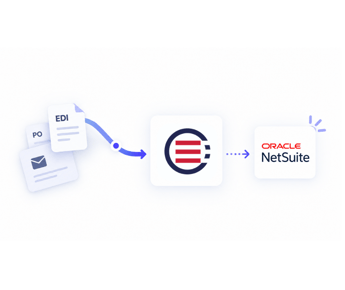
For an inbound purchase order, the workflow typically runs like this:
- Receive: A retailer sends an EDI 850 purchase order through an agreed communication method, such as AS2 or a VAN.
- Translate: The EDI file is converted into a format the integration can read.
- Map: Retailer item numbers, customer identifiers, addresses, and other fields are matched with NetSuite records.
- Validate: The order is checked against required fields, customer terms, and business rules.
- Sync: Accepted order data creates or updates the appropriate NetSuite transaction.
- Respond: Acknowledgements, shipment notices, and invoices are generated from the order and fulfillment data.
Receiving a document successfully doesn’t mean the resulting order is ready for fulfillment.
For how EDI fits alongside your other systems, see our modern EDI integration guide.
Which NetSuite EDI transactions do you need?
Start with the documents your trading partners require, not every EDI transaction available.
|
Transaction
|
What it does
|
What your integration needs
|
|
EDI 850
|
Purchase order
|
Map incoming order details to NetSuite sales orders
|
|
EDI 855
|
PO acknowledgement
|
Confirm acceptance, rejection, or agreed changes
|
|
EDI 856
|
Advance Ship Notice
|
Generate shipment details from fulfillment data
|
|
EDI 810
|
Invoice
|
Convert invoice information into the retailer’s required format
|
|
EDI 860
|
PO change
|
Handle changes to an existing purchase order
|
|
EDI 997
|
Functional acknowledgement
|
Confirm receipt and structural acceptance of an EDI transmission
|
Some retailers also require warehouse or inventory documents.
A supplier selling to Walmart and Home Depot, for example, may need different mapping rules and certification tests for each.
Before selecting software, collect each trading partner’s implementation guide. Identify required documents, communication methods, field specifications, and testing procedures.
For what the 810 itself has to contain, read our EDI invoice guide.
Three ways to integrate EDI with NetSuite
Option 1: Build custom NetSuite integrations
Your technical team develops and maintains the connections using NetSuite APIs, SuiteScript, and supporting EDI translation or communication services.
This gives you the most control over business logic and data. However, your team also owns development, testing, monitoring, troubleshooting, and changes to trading partner specifications. It fits best when you have specialized requirements and staff dedicated to integration maintenance.
Option 2: Use an integration platform (iPaaS)
Platforms such as Celigo let technical teams configure integrations, mappings, and automated workflows across systems.
This suits teams whose EDI is one part of a larger integration project.
However, an integration platform doesn’t remove the work of retailer onboarding, EDI certification, or exception management. Who owns that work depends on the platform and your implementation partner.
Option 3: Use a managed EDI and order management platform
A managed provider, such as OrderEase, offers preconfigured integrations and specialist support for connecting trading partners with NetSuite.
It’s worth evaluating when you’d rather run reliable order processing than own the integration code.
The key distinction is who builds, operates, and maintains the workflows after implementation.
How to build a NetSuite EDI workflow that scales
Whether you’re using custom code, an iPaaS, or a managed provider, five decisions determine how much ongoing work your integration creates.
Step 1: Map retailer data to NetSuite records
A customer may send its own item number, while NetSuite uses an internal SKU. Ship-to locations, units of measure, and customer accounts may also require mapping.
Document the mappings first, then use real purchase orders to confirm that each field reaches the correct NetSuite record. A technically successful import can still produce an incorrect sales order when mapping logic is wrong.
Step 2: Validate incoming orders
A correctly structured EDI file can still carry the wrong price or an item you can’t map. Our EDI vs ERP guide explains why that check belongs to neither system.
Check each incoming order against your business rules:
- Customer identity and ship-to location
- Item numbers and product mappings
- Contract pricing and permitted discounts
- Ordered quantities and units of measure
- Required delivery information
A food distributor, for example, may receive an order for 100 individual units when the item is normally sold in cases of 12.
The workflow should catch the mismatch and either apply the agreed conversion or flag the order.
Don’t change quantities or prices automatically unless an agreed rule allows it.
Step 3: Define what happens when validation fails
Some orders will need a person. What matters is whether staff can fix them before they cause downstream errors.
Decide which discrepancies get corrected automatically, which get held, and who reviews them.
Also confirm how the system handles duplicates, failed syncs, and corrected orders.
Try submitting an order with an unknown item number. Check that the team can find the issue, fix it, and process the order without creating a duplicate.
Step 4: Connect fulfillment and outbound documents
An EDI 850 reaching NetSuite isn’t the end of the workflow. The 855, 856, and 810 each need the right NetSuite and fulfillment data, sent when the retailer requires it.
An ASN must reflect what actually shipped, not simply what the customer originally ordered.
Before go-live, check how partial shipments, backorders, and changes are handled. A simple test order rarely exposes those problems.
Step 5: Test partner onboarding and ongoing changes
Before production, test each partner against its implementation guide, covering successful orders, invalid data, order changes, partial fulfillment, and outbound document errors.
Decide who maintains mappings when a retailer changes its specs.
Some partner-specific configuration is unavoidable. The goal is to stop rebuilding the NetSuite connection every time you add a partner.
What changes when you’re managing multiple retailers?
Consider a consumer goods manufacturer using NetSuite and selling through three national retailers.
One retailer uses its own SKUs. Another requires specific ASN details. The third often changes delivery dates after sending the PO.
With separate integrations, each new requirement can mean more mapping logic, troubleshooting, and testing.
A shared order management approach keeps retailer-specific requirements separate from the core ERP connection.
Exceptions and maintenance often drive EDI’s operating cost as much as transaction volume does.
Before adding another retailer, ask whether your current setup can reuse your NetSuite mappings, validation rules, and monitoring processes. If every onboarding means custom development, the setup gets harder to maintain with each new account.
How OrderEase supports NetSuite EDI workflows
OrderEase provides managed EDI software for NetSuite, with preconfigured connectivity, trading partner support, and order validation.
Instead of building separate custom connections for every order source, suppliers can use OrderEase to capture, standardize, validate, and synchronize orders with NetSuite.
That matters most when EDI is only one of your order channels. Your national retail accounts may require EDI, while independent customers submit purchase orders through email, ecommerce, or a B2B portal.
OrderEase applies the same customer, item, and pricing rules to all of them before accepted orders sync to NetSuite.
NetSuite remains the system of record.
For the full list of supported data flows, see our NetSuite order management integration.
When is OrderEase a good fit?
Consider OrderEase if your business:
- Runs NetSuite and exchanges EDI transactions with retailers.
- Manages multiple trading partners or expects to add more.
- Needs validation of incoming order data before ERP entry.
- Wants support for onboarding and maintaining retailer EDI workflows.
If you only exchange a few documents with one retailer and can process them through a web EDI portal, a broader order management platform may be unnecessary.
What should you verify before choosing a NetSuite EDI provider?
Don’t rank providers by their retailer count alone. Ask each one to demonstrate these against your actual requirements:
|
Evaluation area
|
What to ask
|
|
Trading partner support
|
Can you support our retailers and required document types?
|
|
NetSuite integration
|
Which records and fields sync, and in which direction?
|
|
Validation
|
How are SKU, pricing, quantity, and address discrepancies handled?
|
|
Exceptions
|
Can users correct and retry orders without creating duplicates?
|
|
Onboarding
|
Who handles mapping, certification, and partner testing?
|
|
Ongoing changes
|
Who updates integrations when retailer specifications change?
|
|
Commercial terms
|
What are the implementation, subscription, document, and support costs?
|
Request a demonstration using one successful order and one order that should fail validation.
Judge a NetSuite EDI integration by how much work it leaves your team after go-live.





.png?width=250&name=OrderEase%20logo%2c%20Square%20(2).png)

.png?width=250&height=250&name=OrderEase%20logo%2c%20Square%20(2).png)