




How OrderEase Stands Out vs Legacy EDI Software
OrderEase is built to run modern B2B order operations, not just move EDI documents from point A to point B. Instead of stitching together brittle maps, custom logic, and one-off integrations, OrderEase standardizes every order into a clean, validated, ERP-ready format. This approach shifts control away from IT-heavy EDI maintenance and back to operations teams. As order volume, channels, and trading partners grow, OrderEase scales with your business, without escalating costs, long change cycles, or dependency on EDI vendors.
OrderEase vs
EDI software
EDI software moves the retailer’s order into your systems. OrderEase checks it against your item and customer data first, so wrong orders are held before they reach your ERP.
How OrderEase compares with EDI software
The EDI software column describes the category, not one provider. Capabilities vary by provider and by retailer.
Swipe to compare more →
| What you need it to do | OrderEase | EDI software |
|---|---|---|
| Orders in | ||
| Retailer EDI documents | ||
| Emailed PDF and CSV orders | ||
| Ecommerce and marketplace orders | ||
| Customer ordering portal | ||
| Checks | ||
| Runs every channel through the same checks | ||
| Checks items, pricing and accounts against your ERP and flags errors | ||
| Connections | ||
| Preconfigured ERP integration |
What changes when you leave the EDI portal
EDI software delivers the retailer’s document and leaves the checking, fixing and re-keying to your team.
These are the 4 places the daily work changes.

Wrong orders stop before the ERP
Item, price, customer and ship-to checked against your ERP data
Mismatches held in OrderEase with the reason shown
Fix it once and release it, nothing re-keyed

No portal to copy from
The retailer’s PO arrives as an order, not a screen to retype
Acknowledgement, ship notice and invoice generated from that order
Order status on the order, not behind a separate login

One set of checks for every order
A retailer’s EDI PO and a dealer’s emailed PDF pass the same price and SKU rules
Customer-specific pricing and terms applied before the order moves
One queue for EDI, ecommerce, portal and rep orders
Your order desk owns the exceptions
Held orders fixed in the queue by the people who know the account
No developer needed to release an order
Workflow rules adjusted by operations, not IT
Keep your retailer's network
Change how orders are handled
Your retailer decides how documents reach you. OrderEase checks each order once it arrives and before it reaches your ERP. Network requirements, testing and fees vary by retailer, and we map them with you before we quote.
Order sources
Illustrative workflow. The network route varies by retailer.
Retailer EDI, run by 10 people
How Fence Armor handles Home Depot and Lowe's orders.
Home Depot and Lowe’s expect every supplier to meet the same EDI and compliance standards, regardless of company size. OrderEase gives us the automation to meet those expectations consistently while keeping our team focused on growing the business instead of managing paperwork.
- Home Depot
- Lowe's
- Ship Station
- QuickBooks
FAQs
Which EDI documents does OrderEase send and receive?
Who runs the retailer testing and certification?
How long does it take to add a new retailer?
Can we move retailers over from our current EDI provider one at a time?
Does OrderEase work for retailer dropship programs?
What happens when a retailer changes a requirement?
How is OrderEase priced compared with EDI software?
OrderEase is a monthly subscription plus a one-time setup fee. Plans start at $500 a month and cover retailer EDI alongside emailed PDF, portal and rep orders, with unlimited users. EDI and ERP connections are quoted as a fixed-price implementation package once we know your retailers and systems, so the figure you get is built for your operation rather than taken from a rate card.
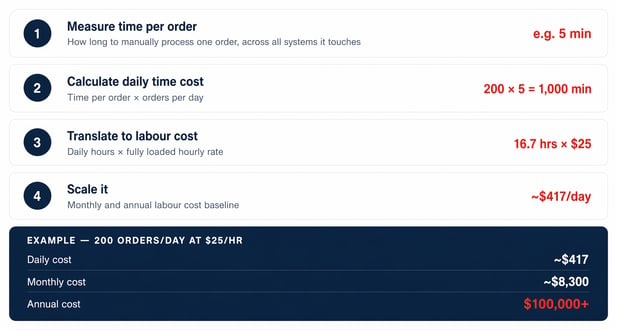
EDI providers price differently from one another, often by trading partner or by document volume, which makes a like-for-like comparison depend on how many retailers you connect and how much of the work is still manual. The ROI calculator shows what the manual side is costing you now: enter your monthly order volume, EDI trading partners and order desk hours, and it returns the hours and dollars at stake.
See how OrderEase fits into your tech stack
Tell us your retailers and your ERP. We'll show what OrderEase would check and which parts of your setup can stay.
Let's talk