


Orchestrates how orders flow through Acumatica. Preconfigured, not coded.


.png?width=300&name=Walmart%20Marketplace%20(1).png)


.png?width=300&name=Walmart%20Marketplace%20(1).png)


.png?width=300&name=Walmart%20Marketplace%20(1).png)


.png?width=300&name=Walmart%20Marketplace%20(1).png)


.png?width=300&name=Walmart%20Marketplace%20(1).png)


How OrderEase Works with Acumatica
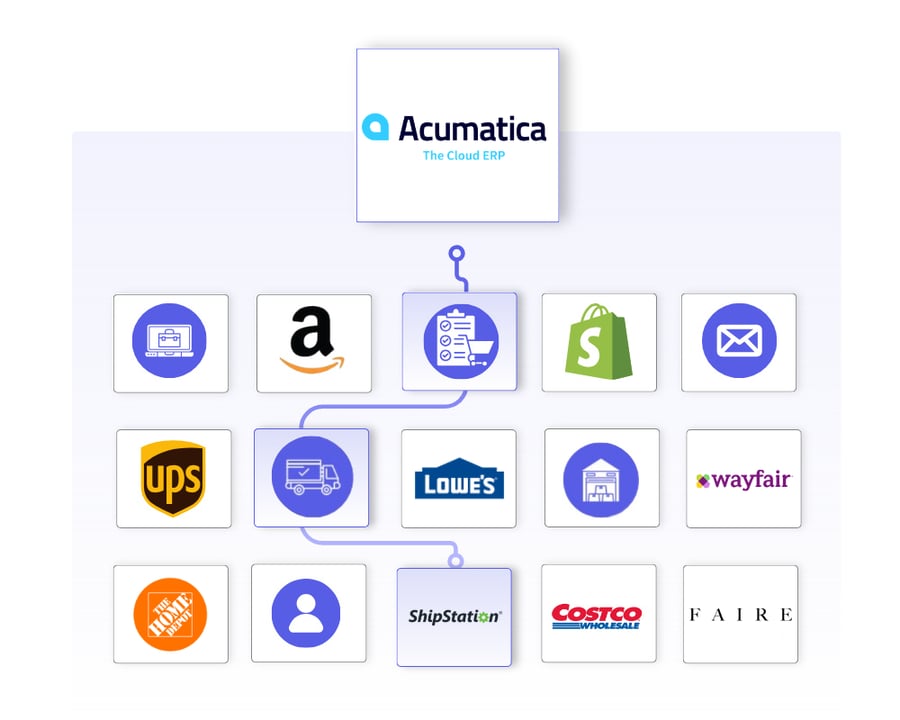
OrderEase orchestrates the full order lifecycle around Acumatica. Orders are captured from connected sales channels, validated against your business rules, and structured to match your Acumatica configuration before they are created as Sales Orders or Sales Invoices.
Fulfillment and invoicing signals are coordinated across connected systems without pushing channel-specific logic into Acumatica. Acumatica stays your system of record for customers, items, inventory, and invoices while OrderEase manages the variability upstream of it.

|
Preconfigured IntegrationsThis is not a build-your-own integration. OrderEase delivers a prebuilt, maintained Acumatica connection over Acumatica's REST API with standardized workflows out of the box. |
Who This Integration Is For
Built for distribution and manufacturing teams managing orders across multiple sources, where order structure, timing, and business rules change from channel to channel. OrderEase manages that complexity so Acumatica stays stable as the system of record.
Your existing Acumatica configuration, workflows, and downstream processes stay intact. Channel-specific logic sits in OrderEase instead, which means no custom scripts, no added middleware, and no ERP redesign.
Acumatica ↔ OrderEase
What This Means for Your Business
OrderEase controls how orders are created in Acumatica, which makes rising order volume easier to absorb.
Fewer manual work fixes
Problems surface and get resolved before an order reaches the ERP. Your Acumatica admins and order desk handle fewer cleanup tasks after the fact.
Your Acumatica setup stays put
Existing branches, customer classes, item classes, and tax zones keep working as configured. New order sources do not change how Acumatica behaves.
Faster channel onboarding
Add a retailer, marketplace, or portal without touching Acumatica configuration. The work happen
Fewer ERP projects
Order-related changes stop becoming Acumatica projects. You avoid repeat cycles of customization, testing, and regression fixes tied to order intake.
Correct orders on arrival
Orders enter Acumatica in a usable state, with the customer matched, the InventoryID resolved, and pricing applied from whichever system you designate. Less time spent fixing records after creation.
Edits in Acumatica flow back
When your finance or ops team changes an order inside Acumatica, order reconciliation reads those changes and updates status, line quantities, and pricing back in OrderEase. The two systems stop drifting apart.
Featured Acumatica Integrations
Discover More IntegrationsExplore our full integration marketplace and see how OrderEase connects Acumatica to the channels, marketplaces, and systems you rely on. |
Common Acumatica Order Management Use Cases
Order Intake and Standardization
Orders from ecommerce, sales reps, B2B portals, and EDI partners are captured and standardized into one operational model before they reach Acumatica.
Upstream Order Validation
Customer eligibility, product availability, pricing, quantities, and required address fields are checked in OrderEase first. Orders that fail validation are held rather than pushed, so Acumatica does not collect broken records.
Order Visibility Outside the ERP
OrderEase gives your team visibility into order flow, fulfillment status, and invoicing without asking Acumatica to act as an operations dashboard.
Scaling Order Volume
Orders map to your existing Acumatica configuration, including warehouses and item classes, so growth does not require ERP redesign.
Configured Acumatica Sync Settings
Control how and when orders flow into Acumatica, and in what form.
Push Order on Status
Choose whether orders push to Acumatica when they are Confirmed or when they are Submitted, so your team can action an order before it lands in the ERP
Push Orders as Sales Orders or Sales Invoices
Push each order into Acumatica as a Sales Order for normal fulfillment, or as a Sales Invoice when the order skips fulfillment entirely
Missing Customer Options
Decide what happens when an order arrives for a customer with no Acumatica link. Reject the order, or create the customer in Acumatica automatically
Use Acumatica Pricing for Orders
Let Acumatica override order pricing at push time instead of keeping the prices captured in OrderEase
Import Orders from Specific Customers
If you pull orders out of Acumatica into OrderEase, name the customers OrderEase should actively pull for
Order Reconciliation
Re-read every order that already has an Acumatica reference and reconcile status, line quantities, and prices back into OrderEase. Useful when your team edits orders in Acumatica after they are pushed
Custom Fields
Map Acumatica user-defined fields on the customer record into OrderEase user-defined fields
Select which Acumatica warehouses OrderEase uses for inventory, so availability is accurate and orders route correctly from the start.
Allowed Locations
Choose the Acumatica warehouses OrderEase should bring inventory in from
Warehouse on Shipment
Set the Acumatica warehouse used when a shipment is created, or leave it to fall back to your Acumatica default
Control which Acumatica customers synchronize so only relevant accounts come across.
Sync Inactive Customers
By default OrderEase brings in active customers only. Turn this on to include customers marked inactive in Acumatica
Customer Matching
Customers match on Acumatica CustomerID. New customers are added to your All Locations buyer group on first sync
Contact and Address Sync
The customer's main contact and address come across as the OrderEase shipping and billing address, with country and state matched against the OrderEase geography list
Custom Fields
Map the Acumatica customer Note field, or Acumatica user-defined fields, into OrderEase user-defined fields
Define how product data flows so catalogs stay aligned with your ERP.
Sync Inactive Products
Bring in stock items marked inactive in Acumatica alongside active ones
Product Types to Pull
Specify which Acumatica item types OrderEase should bring in
Import Categories from Acumatica
Turn Acumatica Item Class into the OrderEase product category. Leave off and new products land in a New Product category instead, with existing products keeping the category they already have
Product Matching
Products match on SKU against the Acumatica InventoryID
Pricing
Acumatica default price is brought in as the OrderEase net price when Acumatica pricing is not set to override at order push
Specific Customers
If using OE to pull orders from NetSuite and create them in our system, this setting lets the user specify what customers OE should actively pull orders for
Custom Fields
Select a NetSuite field and decide the data that should be pushed in.
Keep shipment data aligned across both systems.
Create Shipments in Acumatica
Push shipments from OrderEase into Acumatica against the originating Sales Order, including ship date and tracking
Shipment Warehouse Override
Send a specific Acumatica warehouse on shipment creation instead of the Acumatica default
Bring Acumatica billing data into OrderEase for a complete order-to-cash view.
Create Invoices in OrderEase
Pull Acumatica sales invoices into OrderEase, with line items, quantities, unit prices, and tax
Invoice Traceability
Each invoice carries its Acumatica invoice reference, so you can trace an OrderEase invoice back to the Acumatica record
Frequently Asked Questions About Acumatica Integrations
Acumatica manages sales orders well once they exist as clean records. What it does not do is capture and normalize orders arriving from ecommerce, EDI, sales reps, and email in different formats. That intake layer is what OrderEase adds.
Not without added tooling. Acumatica includes sales order processing, but each new channel brings its own formats, SKUs, pack sizes, and validation rules. OrderEase standardizes all of it upstream so Acumatica receives one consistent order structure regardless of source.
Yes. EDI for Acumatica always runs through a dedicated platform that handles trading partner connectivity, X12 translation, and validation before an order becomes an Acumatica record. OrderEase does that work, and adds ecommerce, marketplace, portal, sales rep, and emailed PO intake through the same connection, so every channel arrives in Acumatica in one consistent structure.
Through a prebuilt connection to Acumatica's REST API, authorized with OAuth 2.0 against your Acumatica tenant. It synchronizes customers, stock items, inventory, orders, and invoices, with configurable sync timing and validation rules. No changes are required inside Acumatica.
Orders push to Acumatica in real time once they reach your configured status. Inventory, inbound orders, and invoices sync every 15 minutes. Customers and products sync daily, and every sync can be run manually on demand.
OrderEase validates the customer link, the InventoryID on every line, pricing, quantities, and the full ship-to and bill-to address before an order is pushed. Orders that fail validation are held or the missing record is created first, depending on your Missing Customer and Missing Product settings.
Order reconciliation reads those edits and updates status, line quantities, and pricing back in OrderEase, so both systems reflect the same order.


.png?width=250&name=OrderEase%20logo%2c%20Square%20(2).png)