


Receive Petco purchase orders and send 855, 856, and 810 documents automatically. Preconfigured, not coded.


.png?width=300&name=Walmart%20Marketplace%20(1).png)


.png?width=300&name=Walmart%20Marketplace%20(1).png)


.png?width=300&name=Walmart%20Marketplace%20(1).png)


.png?width=300&name=Walmart%20Marketplace%20(1).png)


.png?width=300&name=Walmart%20Marketplace%20(1).png)


How OrderEase Works with Petco
Petco sends EDI 850 purchase orders. OrderEase receives them, routes them to your team for confirmation, and returns the 855 acknowledgement to Petco automatically.
When you mark a shipment as shipped, the 856 Advance Ship Notice transmits automatically, including Petco's required Bill of Lading. The 810 invoice follows after your ERP creates it.

|
Preconfigured IntegrationsThis is not a build-your-own integration. OrderEase delivers a prebuilt, maintained Petco EDI connection with standardized workflows out of the box. |
Who This Integration Is For
Built for pet industry suppliers who sell to Petco and need EDI compliance without a dedicated EDI team. OrderEase manages every document so you confirm orders, ship, and invoice from one place.
Your existing ERP workflows stay intact. OrderEase sits between Petco and your back office and handles the EDI layer without custom scripts or middleware.
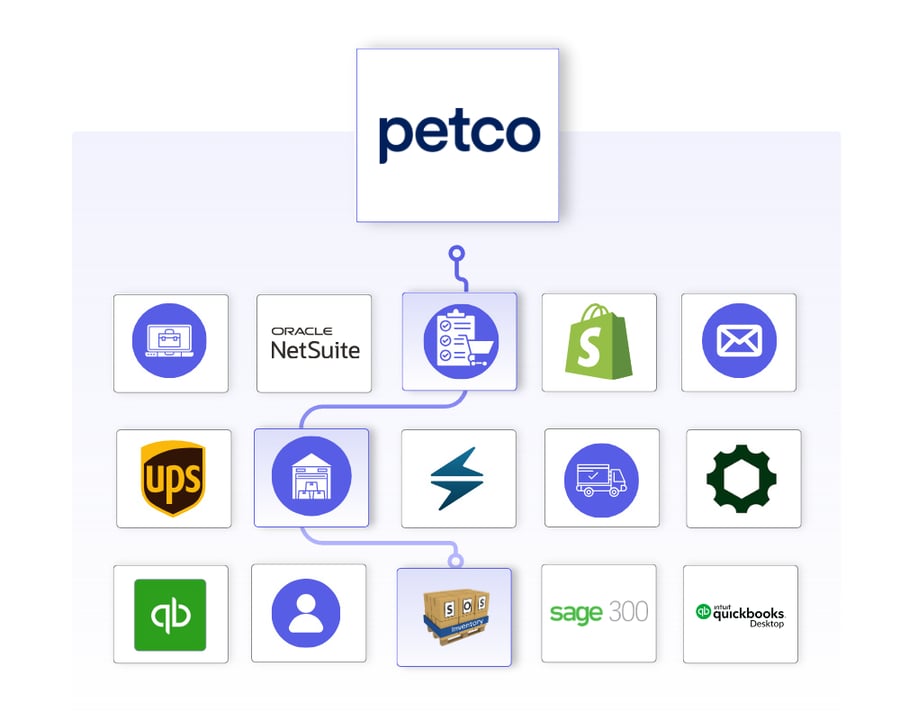
Petco ↔ OrderEase
What This Means for Your Business
OrderEase handles Petco's EDI requirements so your team handles orders, not paperwork.
No manual order entry
Petco POs flow directly into your ERP on confirmation. Your team stops copying order data between systems by hand.
Fewer chargeback risks
The 856 ASN transmits with Petco's required Bill of Lading, package breakdown, and correct timing. Compliance deductions from missing or late documents drop.
Faster Petco onboarding
OrderEase arrives preconfigured for Petco's EDI standards. You don't start from scratch on document mapping or certification.
One place to ship
Shipment confirmation, ASN generation, and label printing all happen inside OrderEase. Your team doesn't log into a separate EDI portal.
ERP changes don't break EDI
If you change your ERP, the Petco EDI connection stays intact. OrderEase sits between Petco and your back office so one side does not break the other.
More orders, same headcount
Petco EDI orders that required manual handling per PO now process automatically. Order volume can increase without adding admin work.
Featured Petco Integrations
Discover More IntegrationsExplore our full integration marketplace and see how OrderEase connects Petco EDI to the systems you already use. |
Common Reasons Petco Suppliers Use OrderEase
First-Time Petco EDI Setup
You're a new Petco vendor and need to get EDI-compliant fast. OrderEase's preconfigured connection gets you through certification without building anything from scratch.
Replacing a Legacy EDI Provider
Your current EDI setup is expensive or requires a separate portal. OrderEase consolidates Petco EDI and ERP sync into one platform.
Adding More Retail Partners
You already sell to Chewy, Pet Supplies Plus, or Tractor Supply and need to add Petco. OrderEase manages multiple EDI trading partners in a single account.
Connecting Petco EDI to Your ERP
Petco orders aren't reaching your ERP automatically. OrderEase pushes confirmed orders to NetSuite, QuickBooks, Sage 300, or SOS Inventory in real time.
Configured Petco EDI Workflow
Control how Petco purchase orders arrive and are created in your account.
Inbound 850 PO
OrderEase receives Petco's EDI 850 and creates the order in your account automatically.
Order Review
Your team sees the PO with line items, quantities, and ship-to DC details ready to action.
Send Petco a compliant 855 acknowledgement on every order, and push confirmed orders to your ERP.
855 PO Acknowledgement
Confirm or adjust quantities line by line in OrderEase. The 855 sends to Petco on confirmation.
ERP Push on Confirmation
Confirmed orders push to your ERP in real time so your team stops re-entering them.
Auto-Confirm
Set orders to auto-confirm when your workflow does not require manual line-by-line review.
Trigger the 856 ASN the moment you ship, with Petco's required Bill of Lading included.
856 Advance Ship Notice
Add package breakdown and Bill of Lading in OE, mark as shipped, and the 856 transmits to Petco automatically.
Petco Shipping Label
Print Petco's required shipping label directly from OrderEase before dispatch.
Bill of Lading Field
Petco requires a BOL on every shipment. If no BOL number is available, the PO number works up to 9 digits.
Package Breakdown
Edit the shipment in OrderEase to add SKU-level package detail before the ASN transmits.
Send a compliant 810 invoice to Petco without a separate EDI portal or file export.
810 Invoice
Create the invoice in your ERP after shipment. OrderEase pulls it and transmits the 810 to Petco.
ERP Invoice Sync
Invoice data flows from your ERP to OrderEase to Petco with no manual upload required.
Frequently Asked Questions About Petco EDI Integration
OrderEase handles the full required set: 850 (Purchase Order), 855 (PO Acknowledgement), 856 (Advance Ship Notice), 810 (Invoice), 860 (PO Change), and 997 (Functional Acknowledgement).
Yes. Petco requires a Bill of Lading on every 856 ASN. OrderEase prompts you to enter it before the shipment transmits. If you don't have a BOL number, the PO number works up to 9 digits.
Confirmed live pairings include NetSuite, QuickBooks Online, QuickBooks Desktop, Sage 300, and SOS Inventory. ShipStation is also supported for fulfillment routing alongside Petco EDI.
No. OrderEase handles document mapping, translation, and compliance updates. Your team works inside OrderEase and never interacts with raw EDI files.
Yes. OrderEase supports multiple trading partners in one account. Pet industry suppliers also run Chewy, Pet Supplies Plus, and Tractor Supply through OrderEase alongside Petco.
The main variable is Petco's own certification schedule. OrderEase's preconfigured connection means your setup work is minimal because document mapping and configuration are included.


.png?width=250&name=OrderEase%20logo%2c%20Square%20(2).png)