


Skip to content
UNFI logo

UNFI EDI Integration


Preconfigured UNFI EDI Connection, Synced to Your ERP

UNFI buys from its suppliers by EDI, and each connection is tested before the first live order. OrderEase's UNFI connection is live in production, so a purchase order lands in your ERP or storefront with UNFI's item code already matched to your SKU.
How to Meet UNFI's EDI Requirements

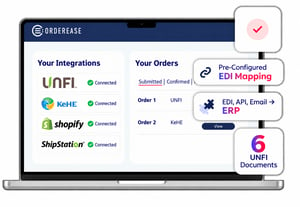
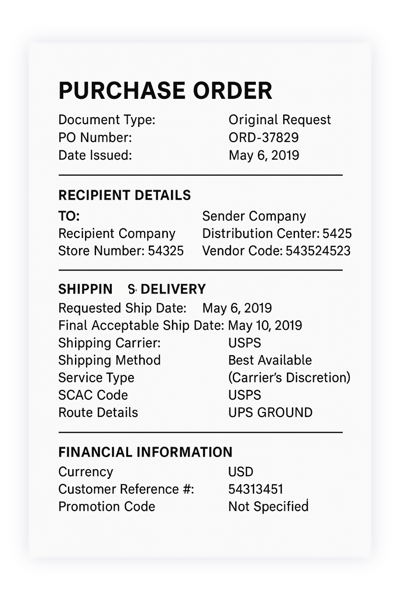
UNFI sends purchase orders by EDI. OrderEase maps each document you send back (acknowledgement, ship notice and invoice), runs the test cycle with UNFI's EDI provider, and pushes every order into your ERP or storefront without rekeying.

UNFI

Supported UNFI EDI Documents:

  • 850 – Purchase Order (from UNFI)
  • 855 – Purchase Order Acknowledgement
  • 856 – Advance Ship Notice (ASN)
  • 810 – Invoice
  • 846 – Inventory Advice
  • 997 – Functional Acknowledgement

    * Additional documents can be added based on retailer or distributor requirements.
UNFI EDI example

Why Suppliers Choose OrderEase for UNFI EDI Integration


UNFI Item Codes Matched to Your SKUs

UNFI issues its own item code for each product you list with it. OrderEase holds those cross-references, so each order arrives against your SKUs, not UNFI's.

Vendor and Trading IDs Set Up Once

UNFI's EDI provider issues your vendor ID and the ISA/GS IDs used for testing and production. OrderEase configures them in your UNFI connection, so the test cycle starts with the identifiers UNFI expects.

Spoilage Allowances Shown on the Invoice

An order-level discount such as a spoilage allowance can post as its own line on the 810, separate from product pricing, so the allowance reads as an allowance.

UNFI EDI Capabilities

EDI Error Detection and Compliance Validation

Validation Before Sending

OrderEase checks each 855, 856 and 810 for format and required fields before it reaches UNFI, so a missing field gets fixed before it becomes a rejection.

ERP and Storefront Integration

ERP and Storefront Integration

UNFI orders flow into Shopify and the ERP or accounting system you already run, with no rekeying.

Multi-partner EDI support

Multi-Partner Support

The same EDI connection carries UNFI alongside your other retail and distributor partners, each with its own document set, so the next one is configuration rather than a new build.

UNFI Better Food Better Future_OrderEase
Shopify

Shopify

EDI docs, pushed to Shopify.

ShipStation logo

ShipStation

Automate Shipping.
Automate EDI and NetSuite

NetSuite

EDI docs, pushed to NetSuite.

Automate  EDI and Blue Link

Blue Link

EDI docs, pushed to Blue Link.

Sage 300 LOGO

Sage 300

EDI docs, pushed to Sage.

Sage 50 logo

Sage 50

EDI docs, pushed to Sage.

QuickBooks logo

QuickBooks Online

EDI docs, pushed to QuickBooks.

QuickBooks Enteprise

QuickBooks Enterprise

EDI docs, pushed to QuickBooks.

Microsoft Dynamics GP logo

Microsoft Dynamics GP

EDI docs, pushed to GP.

Odoo logo

Odoo

EDI docs, pushed to Odoo.

Acumatica logo

Acumatica

EDI docs, pushed to Acumatica.

Xero logo

Xero

EDI docs, pushed to Xero.

Infor logo

Infor

EDI docs, pushed to Infor.
Zoho logo

Zoho

EDI docs, pushed to Zoho.
UPS logo

UPS

Automate Fulfillment. 
ShipWise logo

ShipWise

Automate Shipping.
Frieghtview logo

Freightview

Automate Shipping.
Stallion Express logo

Stallion Express

Automate Shipping.
PPM Fulfillment

PPM Fulfillment

Automate Fulfillment. 

See a UNFI order go from 850 to invoice, no rekeying

See how it works

EDI Integration FAQs

Have questions about trading with UNFI by EDI? Find answers on the documents OrderEase supports, what you need from UNFI before testing, how certification works and how orders reach your ERP.

Which EDI documents does OrderEase support for UNFI?

OrderEase supports six EDI documents for UNFI. UNFI sends the 850 purchase order. OrderEase returns the 855 acknowledgement, 856 advance ship notice, 810 invoice and 846 inventory advice, and exchanges 997 functional acknowledgments in both directions.

What do I need from UNFI before testing starts?

Your UNFI vendor ID, the test and production ISA/GS IDs, and your UNFI item codes. UNFI's EDI provider opens a time-limited testing window, so have these in hand before testing begins.

How does UNFI EDI certification work?
Each document is exchanged in a test cycle with UNFI's EDI provider. Once UNFI confirms the results, the connection moves to production and is monitored through the first live orders.
Can UNFI orders go straight into our ERP or Shopify store?
Yes. OrderEase maps each UNFI 850 to your item codes and pushes it into your ERP or Shopify store, then sends the 855, 856 and 810 as the order is confirmed, shipped and invoiced in your system.