.png?width=250&name=OrderEase%20logo%2c%20Square%20(2).png)


QuickBooks Order Management
Turn QuickBooks into a powerful multi-channel order management system
OrderEase helps you capture sales orders from ecommerce, marketplaces, EDI, and B2B portals and sync them into QuickBooks automatically. QuickBooks remains your source of truth for finances, while OrderEase handles the heavy lifting of order consolidation and automation.
.png?width=250&height=250&name=OrderEase%20logo%2c%20Square%20(2).png)
Use OrderEase when you want QuickBooks order management that:

Captures all orders in one workflow

Cuts the costs of manual order entry

Gives finance and operations real-time visibility
-1.png?width=300&name=Untitled%20design%20(32)-1.png)

Manual data entry
Without a dedicated order management layer, every web order, PO, or rep order must be keyed into QuickBooks by hand. That means hours of repetitive work, higher error rates, and delays between the customer placing an order and your team seeing it in QuickBooks.
Inconsistent records
When orders are captured in different systems, QuickBooks rarely matches what is happening in the warehouse or across channels. Inventory counts drift, pricing rules are applied inconsistently, and reporting becomes a guessing game instead of a reliable view of demand and profit.
Limited automation
QuickBooks can create sales orders and invoices, but complex workflows still rely on people moving data from screen to screen. Routing orders to the right warehouse, managing backorders, partial shipments, or dropship vendors all require manual steps. As volume grows, that approach cannot keep up.
.png?width=75&height=75&name=icons%20(2).png)
Centralize All Orders
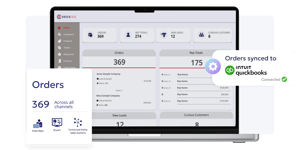
OrderEase consolidates orders from ecommerce storefronts, marketplaces, EDI partners, reps, and email into one queue. Each order is enriched with pricing, inventory, and customer data before it syncs to QuickBooks. Instead of chasing orders across platforms, your team works from a single, prioritized list that matches what appears in QuickBooks.
.png?width=75&height=75&name=icons%20(3).png)
Eliminate Manual Errors
OrderEase applies validation rules before an order reaches QuickBooks. Items, units, shipping methods, and tax codes are checked against your QuickBooks data, and exceptions are flagged for review. By replacing rekeying with automated mapping, businesses typically see order-entry errors and related chargebacks drop dramatically.

Real-Time Visibility
Operations, sales, and finance share the same view of order status. Dashboards show what has been captured, picked, shipped, invoiced, or backordered, and those statuses are reflected in QuickBooks. Instead of waiting for end-of-day updates, teams can answer customer questions with current information.

Scalable & Flexible
As you add more channels or brands, OrderEase scales with you. Handle higher order volumes, multiple warehouses, and complex pricing structures without redesigning your QuickBooks file. Configuration options let you tailor order flows for QuickBooks Online or QuickBooks Desktop while keeping reporting consistent.
.png?width=75&height=75&name=icons%20(1).png)
Quick Implementation
OrderEase's implementation process focuses on mapping what you already have. Items, customers, and pricing structures are imported from QuickBooks, standard workflows are preconfigured, and your team gets guided onboarding. Most organizations start running live orders within weeks instead of months.

Reliable & Supported
OrderEase is maintained by a team that understands both QuickBooks and multi-channel operations. Connectors are kept current as versions and channels evolve, and support is available from people who speak the language of purchasing, inventory, and accounting. You are not left to assemble and maintain integrations on your own.
Multi Channel Order Capture in One Workflow
Every channel uses the same underlying catalog, pricing, and inventory, and every order follows a consistent process into QuickBooks.
.png?width=75&height=75&name=icons%20(6).png)
.png?width=75&height=75&name=icons%20(7).png)
.png?width=75&height=75&name=icons%20(8).png)

.png?width=400&height=400&name=Untitled%20design%20(25).png)

.png?width=400&height=400&name=Untitled%20design%20(26).png)
.png?width=200&height=200&name=Untitled%20design%20(27).png)




.png?width=200&height=200&name=Untitled%20design%20(28).png)