


Skip to content
B2B Order Management for Food and Beverage Suppliers

Stop Rekeying Orders From Grocers and Distributors

Capture orders from every retailer and distributor. Apply your own item codes, case packs and pricing, and hand your ERP or storefront an order that has already been checked.
Natural & Specialty FoodFrozen & RefrigeratedBeverage AlcoholFoodservice
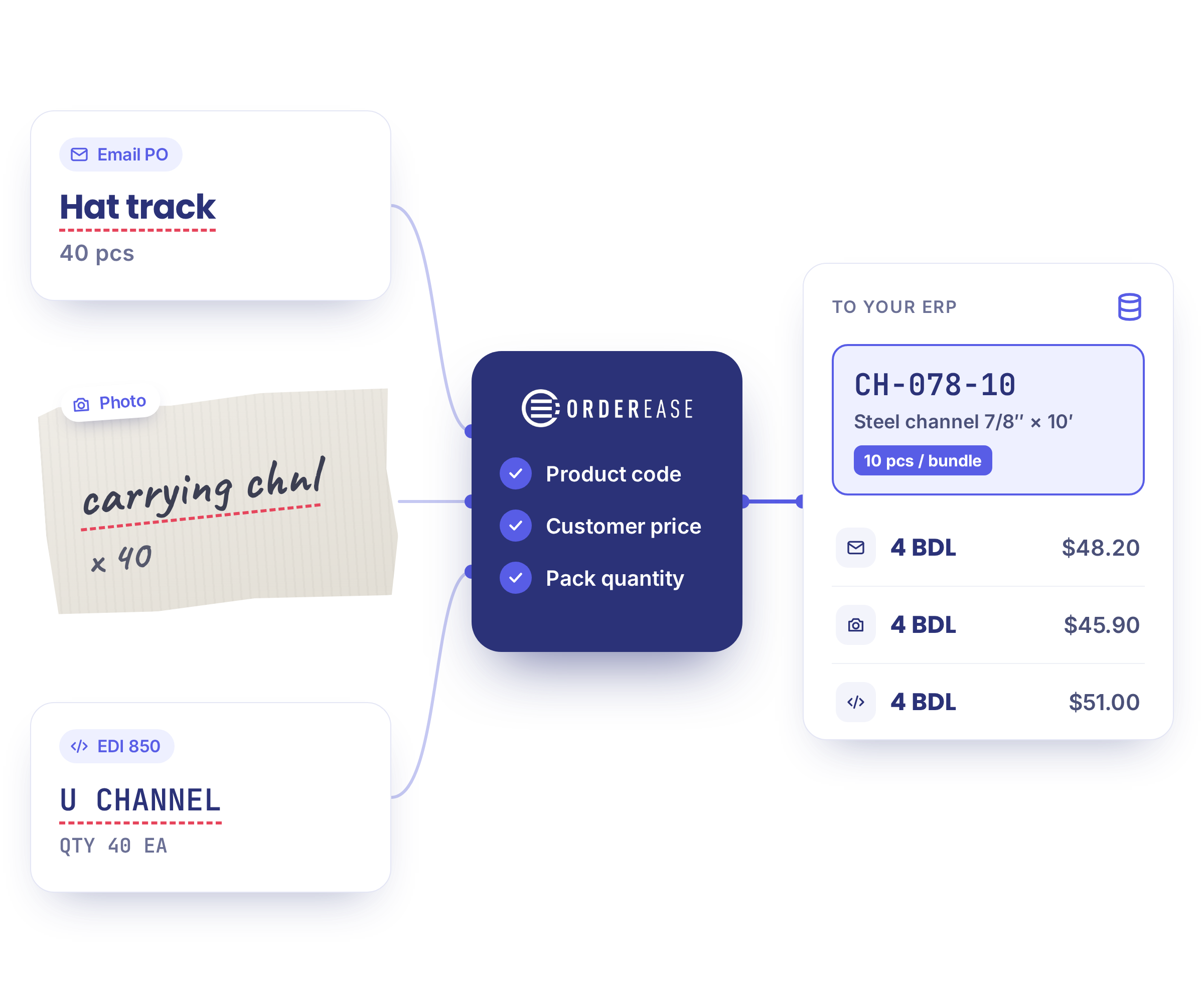
OrderEase captures contractor, emailed and big-box EDI orders, checks codes, pricing and pack quantities, and syncs them to your ERP.
Our integration partners
US Foods
KeHE
UNFI
Thrive_Market
Costco
LCBO
Metro
Loblaws
US Foods
KeHE
UNFI
Thrive_Market
Costco
LCBO
Metro
Loblaws
US Foods
KeHE
UNFI
Thrive_Market
Costco
LCBO
Metro
Loblaws
US Foods
KeHE
UNFI
Thrive_Market
Costco
LCBO
Metro
Loblaws
US Foods
KeHE
UNFI
Thrive_Market
Costco
LCBO
Metro
Loblaws

Why the Order Still Waits After the PO Arrives

A retailer sends a purchase order for 12 cases. Someone opens it, works out how many eaches that is, matches the retailer's item number to your SKU and keys it in. Then the ship notice is due, and the lot numbers, expiration dates and pallet labels sit somewhere else.

Cases, eaches and pallets don't match

Retailers order in cases and often don't write the pack size into the order. Your ERP counts eaches, so someone does the conversion, order by order.

The ship notice needs data the order never carried

Lot numbers, expiration dates, case dimensions and pallet labels all have to be on the ship notice before the truck arrives, and they don't live in one place.

The retailer's item code isn't yours

UNFI and US Foods each identify a product their own way, by their item number, your part number or a case GTIN. Matching them is a spreadsheet one person owns.

Take the Manual Work Out of Repeat Orders

The order reaches your ERP already checked, whichever channel it came from. Adding a retailer becomes configuration rather than a new build.

CASE STUDY | Muskoka Brewery

Muskoka Brewery stopped exporting files and keying LCBO orders

OrderEase creates, formats and transfers the brewery's LCBO orders, so the team no longer enters customer data or sends fulfillment updates by hand.

Read the Muskoka Brewery story
20 mins
Weekly check of LCBO orders going to the fulfillment partner
Published customer result. Outcomes depend on your implementation.

Check Orders Before They Reach Your ERP

Emailed POs, big-box EDI and portal orders all arrive in different formats. The checks happen once, before any of it reaches your ERP or POS.

01 · Capture

Your order channels

Emailed and faxed POs · Big-box EDI · FCB2B · Customer portal · Sales reps · Ecommerce
02 · Check

OrderEase

Apply your product codes, customer pricing, units and pack quantities.
Exceptions go to your team for review.
03 · Sync

Your ERP or POS

Receive the sales order: Klipboard ERP One · Dynamics 365 · NetSuite · Sage · QuickBooks · Acumatica

Connections depend on your ERP or storefront, version and required data flows. We'll also review item codes, case packs, customer pricing and each retailer's document requirements.

See the retailer and ERP connections we already run

What This Covers

Which retailer and distributor EDI connections do you already run?
OrderEase runs preconfigured EDI connections for US Foods, KeHE, UNFI Canada, Thrive Market, Costco and LCBO, with more added as customers go live. 
 
Can you support our retailers' EDI requirements?

OrderEase supports purchase orders, acknowledgements, ship notices and invoices, including EDI 850, 855, 856 and 810, plus grocery purchase orders (875 and 876) and product activity data (852). Documents, mappings and testing depend on your trading partners.

See EDI order management software ↗

What setup do emailed and PDF POs require?
We review sample POs to confirm supported formats, document mapping and any setup fees. What's required depends on the documents you actually receive. 
Can you handle case packs, lot numbers and expiration dates?
OrderEase applies the case conversion configured for each retailer relationship before the order reaches your ERP, and maps lot and expiration data onto ship notices for retailers that require them. What the ship notice can carry depends on where that data lives in your systems and how clean it is.
Does this replace our production or traceability software?
No. This covers order intake, validation and the handoff to your ERP or storefront. Production planning, ingredient traceability and recall management stay in your own systems.
Do you support LCBO and other provincial liquor boards?
OrderEase runs a preconfigured LCBO EDI connection. Other liquor boards depend on their document requirements and access, so we confirm each one during scoping. 
Are we too small for this?

OrderEase fits when you sell to more than one retailer or distributor, carry retailer-specific item codes and case packs, and the next retailer connection would otherwise mean more manual work. If you receive a handful of orders a month in one consistent format, this is more system than you need.

See pricing ↗

What will implementation involve?
Scoping your systems, retailer requirements and business rules, then configuration, retailer testing and go-live. We'll need sample POs, ERP or storefront access, and someone who owns your item and pricing data. Retailer certification timelines are set by each retailer.

Let's Review Your Order Workflow

Show us how a retailer order reaches your ERP or storefront today. Bring a sample PO and we'll walk through where OrderEase could reduce rekeying, apply your rules and connect the handoffs.